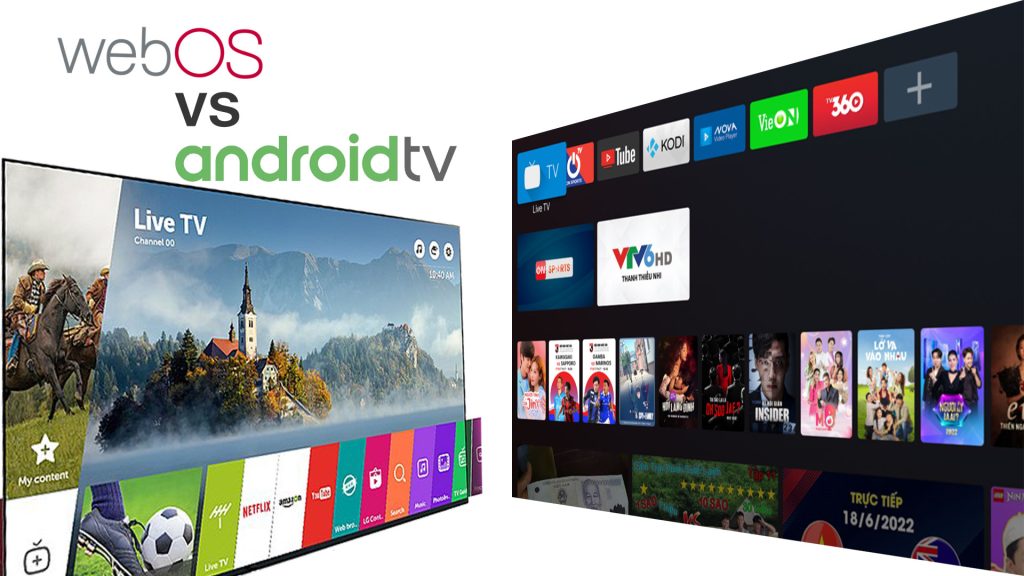
WebOS is a proprietary operating system developed by LG, while Android TV is an open-source platform created by Google.
User Interface
User Interface: The user interface is a crucial element of any smart TV platform. It determines how easily users can navigate through menus, access apps, and interact with their content. Let’s compare the user interfaces of WebOS and Android TV to see how they stack up against each other.
Webos User Interface
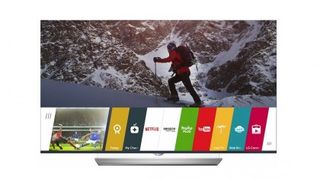
WebOS is known for its intuitive and user-friendly interface. Its main dashboard, called the Launcher, provides quick access to apps, inputs, and settings. Users can easily switch between different apps and inputs, multitask, and customize their home screen with their favorite apps. The ribbon at the bottom of the screen allows quick access to key functions, making navigation a breeze. Additionally, the universal search feature streamlines content discovery by searching across multiple apps and services.
Android Tv User Interface
Android TV offers a familiar and customizable interface, similar to the Android mobile operating system. The home screen features a row of content recommendations tailored to the user’s preferences, making it easy to discover new movies, shows, and apps. The Google Play Store integration allows users to explore a wide range of apps, games, and content options. With Google Assistant integration, users can navigate the interface, search for content, control smart home devices, and get answers to their questions using voice commands.

Credit: www.pcmag.com
App Ecosystem
The app ecosystem plays a crucial role in the success of a smart TV platform. Both WebOS and Android TV offer their own app stores, each with their own unique features and offerings. Let’s take a closer look at the WebOS App Store and the Google Play Store.
Webos App Store
The WebOS App Store is the official app store for LG smart TVs running on the WebOS platform. It offers a wide range of apps that cater to various needs and interests of the users. From popular streaming services like Netflix and Amazon Prime Video to productivity apps like Microsoft Office, the WebOS App Store has something for everyone.
What sets the WebOS App Store apart is its intuitive user interface and rich app discovery experience. The store is designed to showcase trending apps, top charts, and personalized recommendations based on the user’s preferences. This makes it easier for users to discover new and exciting apps to enhance their viewing experience.
Google Play Store
The Google Play Store, on the other hand, is the app store for Android TV. As Android TV is a widely-used platform, the Play Store offers a vast and diverse collection of apps. With over 3 million apps available, users have access to a plethora of entertainment, gaming, educational, and productivity apps.
The Play Store’s strength lies in its extensive app library and the ability to easily download apps that are also available on other Android devices. This means users can seamlessly transition between their Android smartphones, tablets, and Android TV, enjoying a consistent app experience.
Furthermore, the Play Store’s robust search functionality and user-friendly interface make it easy to find and install apps. It also offers user reviews and ratings, allowing users to make informed decisions before downloading an app.
Voice Control
Voice Control is a crucial feature in smart TVs, providing users with hands-free navigation and convenient operation. Let’s explore the Voice Control capabilities of WebOS and Android TV in detail.
Webos Voice Control Features
WebOS offers intuitive voice commands for seamless interaction with your TV.
- Simple commands like “Open Netflix” or “Increase volume to 50”.
- Allows for searching content across multiple streaming services with just your voice.
- Integration with virtual assistants like Google Assistant and Amazon Alexa.
Android Tv Voice Control Features
Android TV provides a robust voice control system enhancing user experience.
- Advanced voice recognition technology for accurate command execution.
- Voice search to find specific shows, movies, or apps quickly.
- Capability to control smart home devices through voice commands.
Credit: www.techradar.com
Hardware Compatibility
When considering a smart TV platform, it’s crucial to look at hardware compatibility for a seamless experience.
Webos Compatible Devices
WebOS is known for its user-friendly interface and smooth performance. It is primarily found on LG Smart TVs, including models like OLED, NanoCell, and UHD TVs.
Android Tv Compatible Devices
Android TV, developed by Google, is widely supported by various manufacturers. It can be found on brands like Sony, Sharp, Hisense, and Philips, among others.
Content Recommendations
When it comes to choosing the right smart TV platform, one crucial factor to consider is the content recommendations provided by the operating system. Both WebOS and Android TV offer personalized suggestions to enhance your entertainment experience. However, there are some key differences between the two. Let’s explore the content recommendations provided by each platform.
Webos Content Recommendations
WebOS, the operating system developed by LG, is designed to make it easy for users to discover new content tailored to their preferences. With WebOS, you can expect a highly intuitive and user-friendly interface that makes navigation effortless. The platform analyzes your viewing habits and suggests movies, TV shows, and apps that align with your interests. Whether you’re into action-packed thrillers or heartwarming dramas, WebOS has got you covered.
With a focus on enhancing user convenience, WebOS offers a variety of content recommendation features. For example, the “My Channel” feature allows you to customize your home screen with your favorite channels and shows, making it quick and easy to access them. You can also enjoy personalized recommendations through the “LG Content Store,” which showcases a wide range of apps that cater to your interests.
Android Tv Content Recommendations
Android TV, on the other hand, offers a different approach to content recommendations. Powered by Google’s vast knowledge and advanced algorithms, Android TV provides a seamless and personalized viewing experience. It leverages your preferences, previous searches, and app usage data to suggest a curated collection of content that you’re likely to enjoy.
Android TV’s content recommendations can be found across various platforms and apps. The “Play Next” row, for instance, is featured prominently on the home screen, displaying the next episode of your favorite TV show or a movie you’ve been meaning to watch. The recommendations continue to evolve and adapt based on your interactions, ensuring that you’re always presented with fresh and enticing options.
Moreover, Android TV integrates with popular streaming services like Netflix and YouTube, allowing you to receive recommendations from these platforms as well. With a diverse range of content available at your fingertips, there’s no shortage of entertainment options to explore.
Ultimately, both WebOS and Android TV excel in providing content recommendations that enhance your TV viewing experience. Whether you prefer WebOS’ intuitive interface or Android TV’s integration with various platforms, you can rest assured that both platforms strive to deliver personalized suggestions that cater to your unique interests.
Smart Home Integration
Integrating smart home devices with your TV has become an essential feature in modern homes. With the rise of WebOS and Android TV, the competition for smart home integration has intensified. Let’s take a closer look at the smart home features provided by each platform.
Webos Smart Home Features
WebOS understands the need for seamless connectivity between your TV and other smart devices in your home. With its intuitive interface and user-friendly design, WebOS makes smart home integration a breeze.
- WebOS supports a wide range of smart devices, including lights, thermostats, and security systems. You can easily control these devices directly from your TV.
- The Home Dashboard feature in WebOS provides you with a centralized view of all your connected smart devices. You can access and control them all from one place, making it convenient and efficient.
- WebOS also offers voice control capabilities. By simply using your voice, you can command your TV to adjust the temperature, dim the lights, or lock the doors.
- Furthermore, WebOS supports popular smart home platforms like Google Assistant and Amazon Alexa, allowing you to integrate and control multiple devices from different manufacturers seamlessly.
Android Tv Smart Home Features
Android TV is another powerhouse in the world of smart home integration. With its vast ecosystem and robust features, Android TV provides you with a comprehensive smart home experience.
- Android TV supports a wide variety of smart home devices, including smart lights, speakers, cameras, and more. You can easily connect and manage these devices directly from your TV.
- The Google Home integration in Android TV allows you to control your smart home devices using voice commands. You can ask questions, play music, and control your smart devices effortlessly.
- Android TV also offers the SmartThings integration, which connects and controls your Samsung smart devices seamlessly. From adjusting the thermostat to checking your security cameras, it’s all accessible from your TV.
- Furthermore, Android TV enables you to create custom routines that automate certain tasks based on your preferences. For example, you can create a routine that turns off the lights and locks the doors when you say, “Goodnight.”
When it comes to smart home integration, both WebOS and Android TV have their strengths. Whether you prefer the user-friendly approach of WebOS or the extensive ecosystem of Android TV, you can enjoy a connected and convenient smart home experience with either option.

Credit: www.youtube.com
Frequently Asked Questions For Webos Vs Android Tv
Is Webos Better Than Android Tv?
WebOS and Android TV have distinct features, with some preferring the simplicity and user-friendly interface of WebOS.
Are Webos Tv Good?
Yes, webOS TVs offer a user-friendly interface, diverse app selection, smooth performance, and convenient navigation.
Can Webos Run Android Apps?
No, webOS cannot run Android apps.
What Is The Advantage Of Webos?
WebOS offers a user-friendly interface and seamless integration with various devices. It provides a smooth and efficient operating system for smart TVs, smartphones, and other internet-connected devices. It also offers a wide range of apps and services, enhancing the overall user experience.
Conclusion
Both WebOS and Android TV offer unique features and functionalities that cater to different needs and preferences. WebOS offers a user-friendly interface and seamless integration with LG smart devices, while Android TV provides a vast app ecosystem and customization options.
Ultimately, choosing between these platforms depends on individual requirements and preferences. So, consider your priorities and explore the features each platform offers to make an informed decision for your smart TV setup.