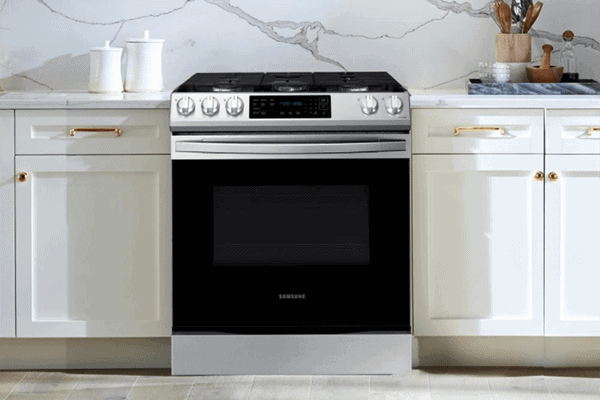
If your Samsung oven is not maintaining temperature, it could be due to a malfunctioning thermostat, a faulty heating element, or a malfunctioning temperature sensor. When your beloved Samsung oven starts misbehaving and doesn’t maintain temperature, it can be frustrating.
This issue may be due to several reasons such as a malfunctioning thermostat, a faulty heating element, or a malfunctioning temperature sensor. The problem may also simply be a need for calibration or keeping the door closed. Over time, the oven can become less accurate due to wear and tear or exposure to high temperatures.
If the thermostat is not reading the temperature correctly, the oven may cycle on and off more frequently than it should, causing the temperature to fluctuate. We will discuss the potential causes of Samsung oven temperature issues and ways to fix them.

Credit: news.samsung.com
Common Causes Of Temperature Issues In Samsung Ovens
If your Samsung oven is not maintaining temperature, it could be due to a malfunctioning thermostat, a faulty heating element, or a malfunctioning temperature sensor. The issue may also simply be a need for calibration or keeping the door closed.
Solution to the issue varies and proper diagnosis is needed.
Common Causes of Temperature Issues in Samsung Ovens If you are experiencing temperature issues with your Samsung oven, don’t worry, you are not alone. Many Samsung oven owners have reported issues like the oven not holding temperature or not heating up enough. In this section, we will discuss some of the common causes of temperature issues in Samsung ovens.Malfunctioning Thermostat
A malfunctioning thermostat is one of the most common causes of temperature issues in Samsung ovens. The thermostat is responsible for regulating the temperature inside the oven. If it’s not working correctly, the oven may not heat up or maintain the desired temperature. In some cases, the thermostat may need to be replaced.Faulty Heating Element
Another common cause of temperature issues in Samsung ovens is a faulty heating element. The heating element is responsible for generating heat inside the oven. If it’s not working correctly, the oven may not heat up or maintain the desired temperature. A burnt-out heating element needs to be replaced.Malfunctioning Temperature Sensor
The temperature sensor inside the oven sends signals to the thermostat to maintain the desired temperature. If this sensor is malfunctioning, the oven may not heat up or maintain the desired temperature. The temperature sensor may require replacement.Need For Calibration
In some cases, the oven may need calibration. Calibration is the process of adjusting the temperature settings of the oven to ensure it’s heating up to the desired temperature. Calibration requires professional services.Issue With The Oven Door
If the oven door is not closing correctly, the oven may not heat up or maintain the desired temperature. An oven door that doesn’t close correctly can cause heat to escape, preventing the oven from heating correctly. Ensure that the door is closed tightly. In conclusion, several factors can cause temperature issues in Samsung ovens, including a malfunctioning thermostat, a faulty heating element, a malfunctioning temperature sensor, the need for calibration, and an issue with the oven door. If you experience any of these issues, it is best to have a professional check and repair your oven.
Credit: www.kitchenaid.com
How To Test And Fix A Samsung Oven Temperature Sensor
To test and fix a Samsung oven temperature sensor, begin by preheating the oven and checking the temperature using an oven thermometer. If the temperature is not accurate, the temperature sensor may need to be replaced. You can test the sensor by measuring its resistance with a multimeter, and replace it if necessary.
If you own a Samsung oven and experience issues with maintaining temperature, the cause could be a faulty temperature sensor. To diagnose and possibly fix this issue, the temperature sensor should be tested and replaced if necessary.Tools Required To Test The Temperature Sensor
Before you begin, gather the following tools:- A digital multimeter
- A screwdriver
- A pair of pliers
Steps To Test The Temperature Sensor
Here are the steps to test a Samsung oven temperature sensor:- First, turn off the oven and let it cool down.
- Locate the temperature sensor, usually located at the back of the oven.
- Remove the screws that secure the sensor to the oven.
- Carefully pull out the sensor until you see the wires connected to it.
- Disconnect the wires from the sensor. You may need to use pliers to gently pull the wires apart.
- Set your multimeter to measure resistance (ohms).
- Touch one multimeter probe to each end of the temperature sensor wires. A working sensor should have a resistance of around 1,100 ohms at room temperature.
- If the resistance reading is significantly different from this, then the sensor needs to be replaced.
Replacing The Temperature Sensor
If your temperature sensor needs to be replaced, follow these steps:- First, turn off the oven and let it cool down.
- Locate the temperature sensor, usually located at the back of the oven.
- Remove the screws that secure the sensor to the oven.
- Disconnect the wires from the sensor.
- Install the new sensor by connecting the wires and securing it with screws.
- Turn the oven back on and test the temperature to ensure it is now maintaining the correct temperature.
Tips To Reset The Samsung Oven Thermostat
Need to reset your Samsung oven thermostat because it’s not maintaining the correct temperature? You can try calibration, checking the heating element, or testing the temperature sensor. Also, ensure the door is fully closed to prevent heat from escaping.
If your Samsung oven is not maintaining temperature, you’re probably struggling to bake your favorite dishes. This could happen due to several reasons, including malfunctioning thermostat, a faulty heating element, or a malfunctioning temperature sensor. Luckily, it’s an easy fix, and you can reset the Samsung oven thermostat to get the accurate temperature. In this post, we have highlighted some tips on how to reset the Samsung oven thermostat and avoid common mistakes.Steps To Reset The Samsung Oven Thermostat
Here are some straightforward steps to reset the Samsung oven thermostat:- Turn off the oven and unplug it from the wall socket to ensure it’s safe to work on.
- Remove the oven racks for easy access.
- Take out the oven temperature sensor located at the back of the oven. Make sure you know the position of the sensor before removing it.
- Use a multimeter to check the sensor’s resistance. If the reading is outside the recommended range for your oven model, replace the sensor.
- Reconnect the oven temperature sensor, turn the oven on, and test the temperature to see if it’s accurate.
Common Mistakes To Avoid While Resetting The Thermostat
Here are some common mistakes you need to avoid whilst resetting the thermostat.- Not waiting for the oven to cool down before accessing its components.
- Working on the oven when it’s plugged in.
- Not wearing gloves or protective gear while working on the oven.
- Wrongly positioning the temperature sensor, which may lead to poor temperature accuracy.
- Leaving the oven racks inside the oven while repairing the thermostat, making it challenging to access the components.
How To Fix A Samsung Oven That Won’t Maintain Temperature
If your Samsung oven is having trouble maintaining its temperature, it could be due to a faulty thermostat, heating element, or temperature sensor. It’s essential to keep the oven door closed and consider calibrating the oven or seeking professional repair.
Cleaning The Oven
One of the first things you should do is clean your Samsung oven. Built-up grease and grime can affect its performance, preventing it from heating up properly. Use a cloth and a mild cleaner to remove any food or debris stuck inside the oven. Don’t forget to clean the racks and the oven door as well.Checking The Heating Element
If your Samsung oven is not maintaining temperature, there’s a chance that the heating element may be the culprit. Make sure to check if the heating element is glowing red when the oven is on. If it’s not, then it may need to be replaced. You can do so by using a multimeter to check the resistance of the heating element.Troubleshooting The Thermostat
Another possible cause for your Samsung oven not maintaining temperature is a malfunctioning thermostat. Check if the thermostat is set to the right temperature and that it’s functioning properly. You can do so by using an oven thermometer to check the temperature inside the oven. If the readings are off, there’s a good chance that the thermostat needs to be recalibrated or replaced.Examining The Oven Door Gasket
Lastly, if your Samsung oven is not maintaining temperature, it could also be because of a damaged oven door gasket. The gasket is a seal that goes around the oven door, keeping the heat inside. Check if there are any cracks or deformities in the gasket, if there are, then it needs to be replaced. A damaged gasket can cause heat to escape, making it difficult for the oven to maintain the desired temperature. In conclusion, maintaining your Samsung oven is essential to keep it functioning properly. Make sure to clean your oven regularly, check the heating element, troubleshoot the thermostat, and examine the oven door gasket. With these simple steps, you can ensure that your Samsung oven will be able to maintain its temperature and cook your food to perfection.Quick Fixes For Samsung Oven Temperature Issues
If your Samsung oven is not maintaining temperature, there could be several potential reasons, such as a malfunctioning thermostat, a faulty heating element, or a temperature sensor issue. It may also simply need calibration or making sure the door is closed.
Troubleshooting and fixing these issues can get your oven back in working order.
Are you facing an issue with your Samsung oven that it is not maintaining the right temperature? Are you worried about the unusual heating or fluctuating temperature of the oven when you bake your favorite dish? Before you reach out to the technician, try out some of these quick fixes. These simple and easy solutions will help you identify the root cause of the problem and could sometimes solve the issue instantly. Here are some quick fixes for Samsung oven temperature issues.Checking The Power Source
The first and foremost step in fixing the temperature issue of your Samsung oven is to check the power source. Check whether the oven is properly plugged into the wall outlet or not. Sometimes, a loose connection or power outage can disrupt the temperature cycle of your oven. So, make sure you have a secure and proper power source for your oven.Resetting The Circuit Breaker
If the oven power source checks out, the next step to try is resetting the circuit breaker. A circuit breaker is a protection switch that automatically turns off when it senses an overload or short circuit. If your Samsung oven is not maintaining the right temperature, there is a possibility that the circuit breaker might have tripped off. Hence, resetting the circuit breaker can do the trick.Examining The Oven Temperature Settings
An oven’s heating system can malfunction if there is an issue with temperature settings. In some cases, a temperature setting is either off or miss-set, causing the oven to produce less or more heat. Double-check that the oven temperature settings are accurate for the dish you are trying to cook. Verify that you are using the recommended temperature settings, as per the recipe book or cooking manual provided with the oven.Avoiding Overloading The Oven
Overloading the oven can cause a temperature fluctuation. An oven’s temperature depends on maintaining correct air circulation inside it. Overcrowding the oven with too many dishes can disrupt the air circulation inside the oven. Consequently, the air will not circulate properly, resulting in unstable heating throughout the oven. So, avoid overloading the oven and try to maintain an appropriate space between dishes to sustain the proper temperature. These fixes are simple and easy to implement. However, if you have tried the above fixes and still face the same temperature issues with your Samsung oven, consider reaching out to a technician. Investing in an annual maintenance checkup is an excellent way to prevent future issues and to keep your cookware in good working order.When To Call A Professional For Samsung Oven Temperature Issues
Experiencing temperature issues with your Samsung oven can be frustrating, often due to a malfunctioning thermostat or faulty heating element. Before attempting to fix it yourself, it may be best to call a professional to diagnose and repair the issue for you.
When to Call a Professional for Samsung Oven Temperature Issues Dealing with a malfunctioning or poorly performing oven can be quite frustrating. If your Samsung oven is not maintaining temperature, it can be a sign of a more significant issue that requires the attention of a professional. While you can troubleshoot the problem on your own and identify the source of the issue, there are some situations where it’s best to call in a professional. In this blog post, we will discuss some of the situations in which you should contact an expert. Complicated electrical or mechanical problems When it comes to electrical or mechanical problems, it is best to call a professional right away. Troubleshooting and repairing these issues require specialized knowledge and tools. If you attempt to fix these problems yourself, you may end up causing more damage to your oven or, worst-case scenario, an electrical fire or explosion. Whether it’s a tripped breaker, faulty wiring, or motor issues, an expert can inspect and repair the problem safely and efficiently. Issues with the oven control board One of the most crucial components of your Samsung oven is the control board, which controls the different functions of your oven, such as temperature, timer, and cooking mode. If your oven is not maintaining temperature, it could be an issue with your oven’s control board. Control board issues are complicated and require technical expertise to fix. An experienced technician can diagnose the problem with your oven’s control board, repair it or replace it entirely if it is beyond repair. Damaged parts that require replacement In some cases, damaged or worn-out parts in your Samsung oven can cause temperature issues. For example, if the bake element in your oven is burned out, it can lead to temperature fluctuation, or if the temperature sensor is malfunctioning, it may not read the temperature accurately, resulting in an oven not maintaining the set temperature. Replacing parts in your oven can be complicated and require specific tools and knowledge. Therefore, it’s best to leave the replacement to an experienced technician who can source the right parts and repair your oven correctly. In conclusion, if your Samsung oven is not maintaining temperature, it’s always best to call a professional. Attempting to diagnose or repair the problem yourself may lead to more damage or safety hazards. By hiring an experienced technician, you can get your oven functioning correctly in no time, while also ensuring the safety of your home and family.Preventive Measures To Avoid Samsung Oven Temperature Issues
When experiencing Samsung oven temperature issues such as the oven not maintaining the correct temperature, it could be due to a malfunctioning thermostat, a faulty heating element or temperature sensor. To avoid these problems, keep the oven door closed, calibrate the temperature, and clean and replace any faulty parts as needed.
Preventive Measures to Avoid Samsung Oven Temperature Issues If your Samsung oven isn’t maintaining its temperature, it can be frustrating and, in some cases, dangerous. The good news is that there are several preventative measures you can take to avoid Samsung oven temperature issues altogether. In this post, we’ll look at some of the most important preventive measures, including regular oven maintenance, proper use of the oven, and avoiding abrasive cleaning materials. We’ll also discuss how you can ensure the oven racks are positioned correctly to keep your oven functioning at its best.Regular Oven Maintenance
Performing regular oven maintenance is one of the most effective preventive measures you can take to keep your Samsung oven functioning at its best. Some routine maintenance tasks you can perform include:- Clean the oven regularly: Cleaning your oven on a regular basis will help prevent the buildup of grease and food particles that can affect your oven’s performance.
- Replace the oven’s heating element: Over time, heating elements can become burnt out or damaged, which can impact the oven’s heating ability. Make sure to replace your oven’s heating element as soon as you notice signs of wear and tear.
- Check the oven’s thermostat: If your oven isn’t maintaining its temperature, it could be due to a malfunctioning thermostat. Checking the thermostat and replacing it if necessary can help prevent temperature issues.
Using The Oven Correctly
Using the oven correctly is also key to maintaining its performance and avoiding temperature issues. Follow these tips to ensure you’re using the oven correctly:- Use the oven’s self-cleaning feature only when necessary: The self-cleaning feature can expose the oven to extreme temperatures, which can cause damage over time. Use it only as needed.
- Preheat the oven before use: Preheating the oven before cooking helps ensure that it’s at the correct temperature for the dish you’re preparing.
- Avoid opening the oven door frequently: Every time you open the oven door, you let heat escape, which can impact the oven’s ability to maintain a consistent temperature.
Avoiding Abrasive Cleaning Materials
Using abrasive cleaning materials on your Samsung oven can cause damage over time, leading to temperature issues. Some cleaning materials, such as steel wool or abrasive scrubbers, can scratch the oven’s surfaces and cause them to wear down faster. To avoid temperature issues caused by damage, use gentle cleaning solutions like vinegar and baking soda or specialized oven cleaners designed for your oven’s specific materials.Properly Positioning Oven Racks
Ensuring proper positioning of your oven racks can also help avoid temperature issues. Position the racks based on the type of dish you’re cooking to ensure optimal heat flow and prevent cold spots from forming. Make sure your oven racks are not bent or warped and are properly seated in the oven. Clean your oven racks regularly to prevent the buildup of dirt and grime that can affect heat flow in the oven. In conclusion, maintaining your Samsung oven properly is crucial to preventing temperature issues. By performing regular maintenance, using the oven correctly, and avoiding abrasive cleaning materials, you can keep your Samsung oven functioning at its best and prevent temperature issues from occurring.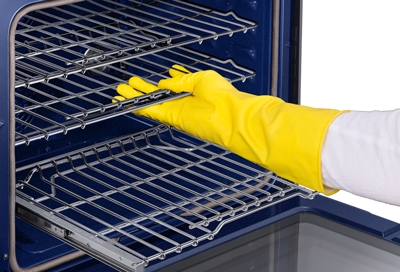
Credit: www.samsung.com
Frequently Asked Questions For Samsung Oven Not Maintaining Temperature
Why Wont My Samsung Oven Hold Temperature?
If your Samsung oven is not holding the correct temperature, it may be due to a malfunctioning thermostat, faulty heating element, or sensor. It could also be a need for calibration or a closed door. Try troubleshooting by checking these components or seek professional help if necessary.
Why Does My Oven Keep Changing Temperature?
There are several reasons why your oven might be changing temperature. It could be a malfunctioning thermostat, faulty heating element, or a need for calibration. The temperature sensor could also be malfunctioning, or you might simply need to keep the oven door closed.
How Do I Test My Samsung Oven Temperature Sensor?
To test your Samsung oven’s temperature sensor, follow these steps: 1) Disconnect power to your oven. 2) Locate the temperature sensor inside the oven and remove it. 3) Use a multimeter to test the sensor’s resistance at room temperature. It should be around 1,080 ohms.
4) If there is a significant deviation from this value, you may need to replace the sensor. 5) Reinstall the sensor and connect power to your oven.
How Do I Reset My Samsung Oven Thermostat?
To reset your Samsung oven thermostat, turn off the power supply to your oven and unplug it. Wait for a few minutes and then plug it back in. Turn on the power supply and set the oven to the desired temperature.
Press and hold the “oven” or “bake” button for five seconds until the display shows “cal. ” Release the button and press it again until the desired calibration temperature is reached. Then, press the “start” button to save the changes.
Conclusion
To summarize, a Samsung oven not maintaining temperature is a common problem that can be caused by a variety of issues, including a malfunctioning thermostat, heating element, or temperature sensor. However, calibration or simply keeping the door closed could also be the issue.
Therefore, it is important to troubleshoot the problem and seek expert help if needed. Remember, regular maintenance of the oven can prevent such issues in the future and ensure its longevity.